This comes up so often. I get a message from someone that says their laptop battery is only holding a charge for a couple minutes, or worse, not at all. Sometimes they think they need a new computer.
This is what happens when you treat your laptop like a desktop computer. By that I mean they always leave it plugged in and they are constantly charging it. All laptop batteries are designed to be used for maximum life. That means you should plug it in and charge it 100% and then you should unplug it and use it until it is down to 10% or less. A good rule is to plug it in when the screen starts to dim. This is caused by the built-in battery saver.
This doesn’t mean you can’t leave it plugged in if you are doing something very important and you want to make sure it doesn’t die. You just need to regularly use your battery as much as possible. They sort of have muscle memory and if you only use the top 10% and constantly charge it eventually that 10% is all you will have.Another issue with leaving your laptop plugged in all the time is THERMAL RUNAWAY. Your battery can actually become damaged and begin to swell. In extreme cases the battery can even explode. Here is a picture of a couple batteries, one brand new battery on the right and one that has begun to experience thermal runaway.
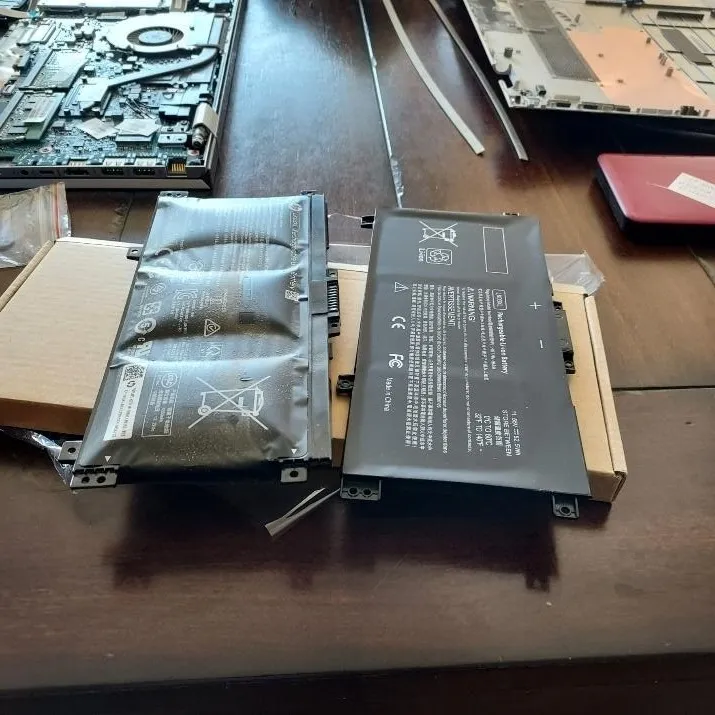
The laptop keyboard and trackpad were not working any longer due to the bulging battery.
So, if you have been in the habit of always leaving your laptop plugged in, you might want to start using your battery to preserve its life. If it is too late and your battery is almost dead, I can help you replace it.
Want to get my computer services updates and reminders directly into your email inbox? Sign up for my FREE Newsletter!