Anti-Virus Companies vs. Marketing Companies

Every so often, I get a customer that sends me a picture of something that has popped up on their computer, and they want to know if they should be concerned by this or not. The picture below is from Norton, but there are many anti-virus companies that do this. I see similar forms of McAfee, AVG and Avast to name just a few.
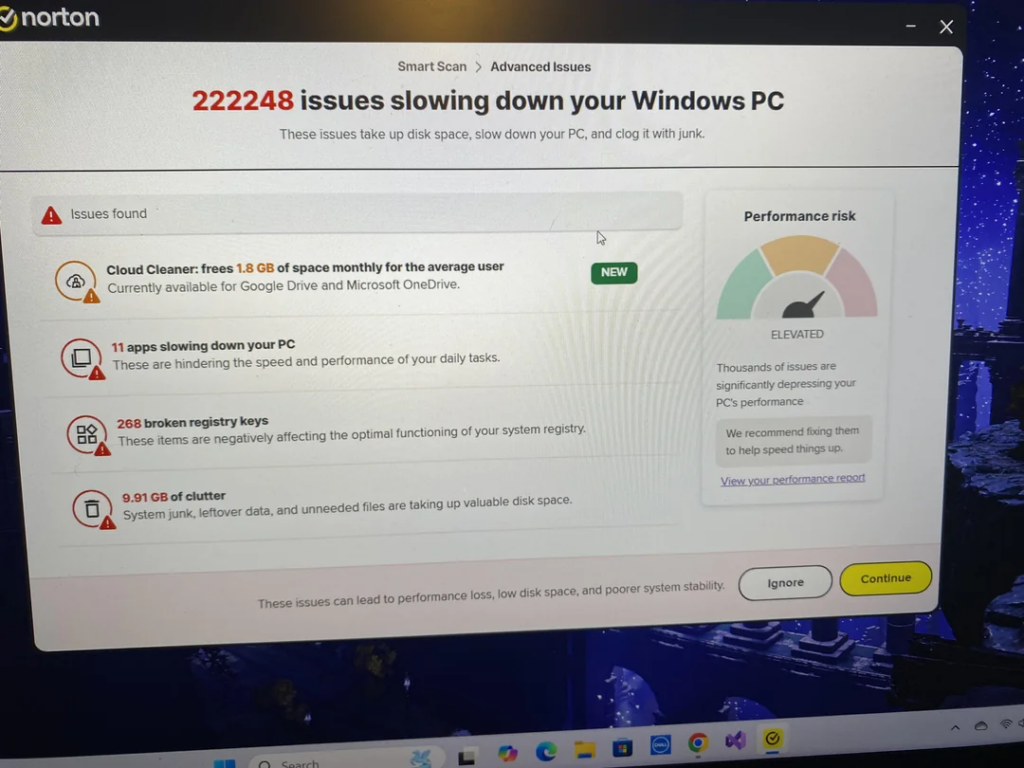
I get it, these companies want to find more ways to make money from their existing customers. That is a proven business model. My issue with this is that the extra tools they are pushing are not worth the extra money and in most cases, they are not even needed. In some cases, they can even slow your computer down. They use scare tactics to boost their bottom line. Anytime your anti-virus wants to run something like this “smart scan” don’t waste your time. It is their code for “let’s get you to buy more stuff.”

The only exceptions to this are a few tools that actually work and you might get them cheaper by purchasing from a company you already do business with. Here are the items:

  1. VPN – If you regularly travel and use hotel and airport wifi, or if you have a lot of meetings in coffee shops and use their wifi, adding a VPN is a great idea. A VPN can certainly protect your computer while using this type of unsecured wifi. You really have no idea who could be watching you and trying to access your computer while on an open wifi system.
  2. Password Manager – I have talked a lot about password managers and if your anti-virus offers one I think you should compare the cost to a standalone password manager. Also make sure it has all of the tools and services that the stand-alone version has. Convenience could be another reason to go with the password manager that comes with your anti-virus.
  3. Web Protection Extensions – Many anti-viruses came with an extension for all of your web browsers that will protect you from dangerous sites and downloads. These usually don’t cost more but are just another tool included in their original price. I always recommend installing these as they are very helpful.

One last thing about anti-viruses. I do not recommend any of the free versions because there is only one reason for these companies to give you their product for free. That reason is that they can charge you in the future. I have seen people start with the free versions and before too long they are spending more than $100 per year. The free anti-virus companies are the best at scary marketing. Don’t fall for it.

As I always say, I am happy to help you find a great anti-virus and I do have strong opinions about many of them. Feel free to contact me for help with this and if you are getting the aforementioned pop-ups from your current anti-virus, I can find you one that won’t constantly bother you for more money.


Want to get my computer services updates and reminders directly into your email inbox? Sign up for my FREE Newsletter!
Anti- Virus Protection

I get asked about anti-virus protection a lot. Questions like “do I really need anti-virus?” “What anti-virus is best?” Also, I get questions about specific anti-virus products and my opinion of them. So here are my thoughts on various types and brands of anti-virus.

  1. Do I really need an anti-virus program? Yes, every computer, whether it is Windows or Apple, should have an antivirus installed on it. Even people that are very cautious about using their computers can still accidentally click the wrong thing or accidentally allow something harmful onto their computers. I know Apple used to claim their computers don’t get viruses, but I have removed many viruses from MACs, so this is not true. Windows computers all come with Windows Defender preinstalled. If you don’t have another anti-virus installed this will give you a little bit of protection.
  2. Are the free versions enough?  No, there is only one reason that a company gives you something for free. They give it free so they can then sell it to you in the future. All of the “free” products are really just marketing companies that constantly try to upsell you more products based on fear. I always feel like these companies have become the thing they should be stopping. They just keep popping up with new scary things and offer more products to protect you from those scary things. Most of those scary things are not real or needed. I have also installed a paid anti-virus on many computers that have a free version and during the initial scan the paid product finds things the free one never found. If your antivirus keeps telling you about new scary threats and offering to fix it for a price, give me a call and I will tell you if the threat is real or not.
  3. What anti-virus is the best?  That is not a completely straight forward question. It really depends on whether you are using a personal computer or a work environment computer. Sometimes it makes sense to use a product with an add on if you were going to purchase that add on from someone else. For personal computers I like two different A/Vs. My go to products are ESET and Webroot. They both do a good job, and they don’t constantly try to sell you more stuff. For business machines I recommend endpoint protection. The difference between endpoint and traditional A/V is that the endpoint versions can be managed by a console where all company machines can be monitored and remotely fixed if there is a threat present. Another great feature is that an employee, or a bad actor, can’t even uninstall the endpoint. It can only be done from the console. If you have a couple of computers in your company, I can help you get this important coverage, and I will handle the monitoring for you.
  4. My computer came with a free trial from McAfee, should I just keep that one? I call McAfee the virus of the antivirus world. Their biggest marketing move was offering this free trial to all computer makers. They get a kickback from McAfee for adding this to their computers and whenever someone purchases from this trial. In a few instances I have pulled a computer out of the box and while setting it up I could not access the internet. After trying to fix it in the McAfee settings I ended up removing McAfee and then I could access the internet. They are probably the worst at pop-ups, trying to scare you and sell you more unnecessary stuff. They also give Adobe and a few other companies a kickback for allowing their product to download with the real software that you wanted. When downloading anything watch out for check boxes to avoid getting things you don’t want. This extra product can slow down your system. It is always best to only have one antivirus on your computer. If you have more than one, they can cause issues for each other. More is not better.

I hope this has been helpful. Antivirus should not be expensive, and it should run in the background and not bother you too often. You should know what antivirus you are using so that if you happen to see another one on your computer you can quickly get rid of the extra one. I am always happy to help with questions about this topic.